Introduction
Mechanical design software enables engineers and designers to create, simulate, and refine mechanical components and systems digitally before manufacturing. These tools typically include capabilities such as 2D drafting, 3D modeling, parametric design, simulation, and collaboration features, helping teams streamline product development and reduce costly errors.
As product development cycles become shorter and more complex, mechanical design software plays a critical role in improving efficiency, enabling innovation, and supporting digital transformation initiatives across industries. From startups building prototypes to large enterprises managing complex assemblies, these tools are foundational to modern engineering workflows.
Common use cases include:
- Designing mechanical parts and assemblies
- Product prototyping and validation
- Engineering documentation and drafting
- Simulation and stress testing
- Manufacturing preparation (CAM integration)
What buyers should evaluate:
- 3D modeling and parametric design capabilities
- Simulation and analysis features
- Integration with CAD/CAM/CAE ecosystems
- Ease of use and learning curve
- Collaboration and version control
- Performance with large assemblies
- Cloud vs local deployment options
- Automation and customization
- File compatibility and standards support
- Security and access control
Best for: Mechanical engineers, product designers, manufacturing teams, and R&D departments across industries like automotive, aerospace, industrial equipment, and consumer products.
Not ideal for: Users needing only simple 2D drafting or non-engineering design tasks where lightweight tools may suffice.
Key Trends in Mechanical Design Software for 2026 and Beyond
- AI-assisted design: Automated geometry creation and optimization
- Cloud-native CAD platforms: Increasing adoption of browser-based design tools
- Generative design workflows: AI-driven design alternatives based on constraints
- Integrated simulation: Real-time validation during design
- Collaboration-first platforms: Multi-user editing and cloud sharing
- Digital twin integration: Connecting design models with operational data
- Low-code customization: Automation without heavy scripting
- Subscription licensing models: Flexible pricing and scalability
- Cross-platform interoperability: Improved file compatibility and standards
- Enhanced security features: Role-based access and data encryption
How We Selected These Tools (Methodology)
- Analyzed industry adoption and global market presence
- Evaluated feature completeness across design, simulation, and manufacturing
- Considered ease of use and onboarding experience
- Assessed performance with complex assemblies and large datasets
- Reviewed integration capabilities with CAD, CAM, and PLM systems
- Examined deployment flexibility (cloud vs desktop)
- Included tools for various user segments (freelancers to enterprises)
- Evaluated community support and documentation quality
- Considered ongoing innovation and product updates
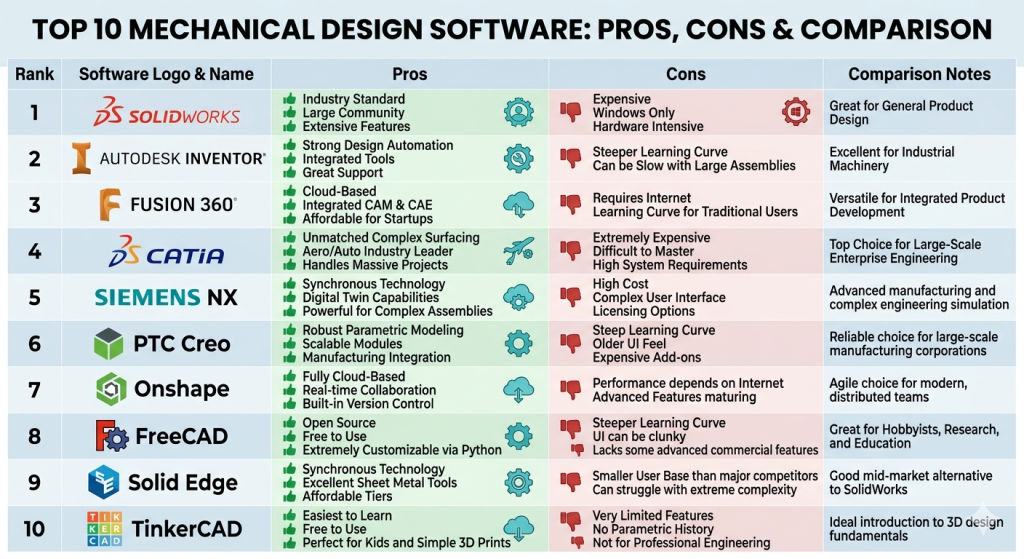
Top 10 Mechanical Design Software
#1 — SolidWorks
Short description: A widely used mechanical design platform offering powerful 3D modeling and simulation capabilities for engineers and product designers.
Key Features
- Parametric 3D modeling
- Assembly design tools
- Integrated simulation
- Motion analysis
- Drawing and documentation tools
- CAM integration
Pros
- User-friendly interface
- Strong industry adoption
Cons
- High licensing cost
- Requires powerful hardware
Platforms / Deployment
Windows | Local
Security & Compliance
Not publicly stated
Integrations & Ecosystem
Strong integration within engineering ecosystems and manufacturing workflows.
- CAD/CAM tools
- PLM systems
- Simulation software
- APIs
Support & Community
Large global community and extensive learning resources.
#2 — Autodesk Inventor
Short description: A professional-grade mechanical design tool for product simulation, visualization, and documentation.
Key Features
- Parametric modeling
- Sheet metal design
- Simulation tools
- Assembly design
- Automation tools
Pros
- Robust feature set
- Good integration with Autodesk ecosystem
Cons
- Learning curve
- Subscription cost
Platforms / Deployment
Windows | Local
Security & Compliance
Not publicly stated
Integrations & Ecosystem
- Autodesk tools
- CAD/CAM systems
- APIs
Support & Community
Strong documentation and support.
#3 — Fusion 360
Short description: A cloud-based CAD/CAM/CAE platform designed for collaborative product development.
Key Features
- 3D modeling
- CAM integration
- Simulation tools
- Cloud collaboration
- Generative design
Pros
- All-in-one platform
- Cloud accessibility
Cons
- Limited advanced features
- Subscription model
Platforms / Deployment
Windows / macOS | Cloud / Hybrid
Security & Compliance
Not publicly stated
Integrations & Ecosystem
- Autodesk ecosystem
- Cloud services
- APIs
Support & Community
Large user base and active community.
#4 — CATIA
Short description: An advanced mechanical design platform used in aerospace and automotive industries.
Key Features
- Surface modeling
- Advanced assemblies
- Simulation integration
- Product lifecycle management
- Complex geometry handling
Pros
- Highly powerful
- Industry standard for large enterprises
Cons
- Expensive
- Complex interface
Platforms / Deployment
Windows / Linux
Security & Compliance
Not publicly stated
Integrations & Ecosystem
- PLM systems
- Engineering tools
- APIs
Support & Community
Enterprise-grade support.
#5 — Siemens NX
Short description: A comprehensive CAD/CAM/CAE solution for advanced product engineering.
Key Features
- Advanced modeling
- Simulation tools
- Manufacturing integration
- Digital twin capabilities
- Automation tools
Pros
- End-to-end solution
- High scalability
Cons
- Expensive
- Complex setup
Platforms / Deployment
Windows / Linux
Security & Compliance
Not publicly stated
Integrations & Ecosystem
- PLM systems
- CAD/CAM tools
- APIs
Support & Community
Strong enterprise support.
#6 — PTC Creo
Short description: A parametric CAD software known for robust design and simulation capabilities.
Key Features
- Parametric modeling
- Simulation tools
- Additive manufacturing support
- AR integration
- Design automation
Pros
- Powerful features
- Scalable
Cons
- Steep learning curve
- Costly
Platforms / Deployment
Windows
Security & Compliance
Not publicly stated
Integrations & Ecosystem
- PLM systems
- CAD tools
- APIs
Support & Community
Strong enterprise support.
#7 — Onshape
Short description: A cloud-native CAD platform focused on collaboration and real-time design.
Key Features
- Cloud-based modeling
- Real-time collaboration
- Version control
- Parametric design
- Mobile access
Pros
- No installation required
- Strong collaboration
Cons
- Internet dependency
- Limited offline capabilities
Platforms / Deployment
Web / Mobile | Cloud
Security & Compliance
Not publicly stated
Integrations & Ecosystem
- Cloud tools
- APIs
- Engineering workflows
Support & Community
Growing community and support.
#8 — FreeCAD
Short description: An open-source parametric 3D modeling tool suitable for mechanical design.
Key Features
- Parametric modeling
- Open-source customization
- Modular architecture
- 2D and 3D design
- Scripting support
Pros
- Free to use
- Flexible
Cons
- Limited UI polish
- Slower development
Platforms / Deployment
Windows / macOS / Linux
Security & Compliance
Not publicly stated
Integrations & Ecosystem
- Open-source tools
- Plugins
- Custom workflows
Support & Community
Active open-source community.
#9 — Solid Edge
Short description: A CAD software offering synchronous technology for fast and flexible design.
Key Features
- 3D modeling
- Synchronous technology
- Simulation tools
- Electrical design
- Manufacturing integration
Pros
- Flexible modeling
- Good performance
Cons
- Learning curve
- Licensing cost
Platforms / Deployment
Windows
Security & Compliance
Not publicly stated
Integrations & Ecosystem
- Siemens ecosystem
- CAD tools
- APIs
Support & Community
Moderate support and resources.
#10 — TinkerCAD
Short description: A beginner-friendly design tool for simple 3D modeling and prototyping.
Key Features
- Simple 3D modeling
- Browser-based
- Educational tools
- Easy interface
- Basic simulation
Pros
- Very easy to use
- Free access
Cons
- Limited features
- Not for complex design
Platforms / Deployment
Web | Cloud
Security & Compliance
Not publicly stated
Integrations & Ecosystem
- Basic CAD tools
- Educational platforms
Support & Community
Good for beginners.
Comparison Table (Top 10)
| Tool Name | Best For | Platform(s) Supported | Deployment | Standout Feature | Public Rating |
|---|---|---|---|---|---|
| SolidWorks | Professional design | Windows | Local | Ease of use | N/A |
| Inventor | Product design | Windows | Local | Autodesk integration | N/A |
| Fusion 360 | SMB/cloud users | Win/macOS | Hybrid | All-in-one platform | N/A |
| CATIA | Enterprise | Win/Linux | Local | Advanced modeling | N/A |
| Siemens NX | Large enterprises | Win/Linux | Local | Digital twin | N/A |
| PTC Creo | Advanced CAD | Windows | Local | Parametric design | N/A |
| Onshape | Collaboration | Web | Cloud | Real-time editing | N/A |
| FreeCAD | Open-source users | Multi-platform | Local | Free usage | N/A |
| Solid Edge | Flexible design | Windows | Local | Synchronous tech | N/A |
| TinkerCAD | Beginners | Web | Cloud | Simplicity | N/A |
Evaluation & Scoring of Mechanical Design Software
| Tool Name | Core | Ease | Integrations | Security | Performance | Support | Value | Weighted Total |
|---|---|---|---|---|---|---|---|---|
| SolidWorks | 9 | 8 | 9 | 6 | 9 | 9 | 6 | 8.2 |
| Inventor | 8 | 7 | 8 | 6 | 8 | 8 | 7 | 7.7 |
| Fusion 360 | 8 | 8 | 8 | 6 | 7 | 8 | 7 | 7.7 |
| CATIA | 10 | 6 | 9 | 7 | 10 | 9 | 5 | 8.3 |
| Siemens NX | 10 | 6 | 9 | 7 | 10 | 9 | 5 | 8.3 |
| PTC Creo | 9 | 6 | 8 | 6 | 9 | 8 | 6 | 7.8 |
| Onshape | 8 | 9 | 8 | 7 | 7 | 8 | 7 | 7.8 |
| FreeCAD | 6 | 6 | 6 | 5 | 6 | 6 | 9 | 6.6 |
| Solid Edge | 8 | 7 | 8 | 6 | 8 | 7 | 7 | 7.6 |
| TinkerCAD | 5 | 10 | 5 | 5 | 5 | 6 | 10 | 6.8 |
How to interpret scores:
- Higher scores indicate stronger overall capability but may come with complexity
- Enterprise tools excel in performance and scalability
- Cloud tools score higher in ease of use and collaboration
- Open-source tools offer high value but may lack polish
- Choose based on your workflow, not just the score
Which Mechanical Design Software Is Right for You?
Solo / Freelancer
- FreeCAD or Fusion 360
- Best for affordability and flexibility
SMB
- SolidWorks or Fusion 360
- Balance of features and usability
Mid-Market
- Inventor or Solid Edge
- Strong integration and scalability
Enterprise
- CATIA, Siemens NX, PTC Creo
- Advanced features and large-scale capabilities
Budget vs Premium
- Budget: FreeCAD, TinkerCAD
- Premium: CATIA, Siemens NX
Feature Depth vs Ease of Use
- Advanced: CATIA, NX
- Easy: TinkerCAD, Fusion 360
Integrations & Scalability
- Best: Siemens NX, SolidWorks
Security & Compliance Needs
- Enterprise tools generally offer better control and deployment flexibility
Frequently Asked Questions (FAQs)
What is mechanical design software?
It helps engineers create and test mechanical components digitally.
Is CAD the same as mechanical design software?
CAD is a core component, but mechanical design tools often include simulation and manufacturing features.
Which tool is best for beginners?
TinkerCAD or Fusion 360 are good starting points.
Are cloud-based tools reliable?
Yes, but depend on internet access and security policies.
Do I need training?
Most advanced tools require formal training.
Can these tools integrate with manufacturing?
Yes, many include CAM features or integrations.
Are free tools good enough?
For simple projects, yes—but limited for advanced use.
What industries use these tools?
Automotive, aerospace, manufacturing, and consumer products.
How expensive are these tools?
Varies widely—from free to enterprise-level pricing.
Can I switch tools easily?
Switching is possible but may involve file compatibility challenges.
Conclusion
Mechanical design software is a cornerstone of modern product development, enabling teams to design, simulate, and optimize efficiently. While enterprise tools offer unmatched power, cloud-based and open-source options provide flexibility and affordability.
